 Veranda
The Veranda manual
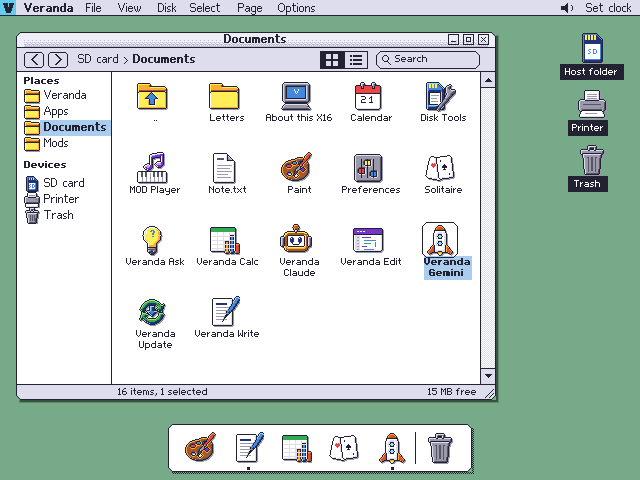
Veranda is a graphical desktop for the Commander X16. It runs on a stock X16 at 640 x 480. It has windows, menus, icons, a dock and many programs: a word processor, a spreadsheet, a paint program, a text editor, network programs, games and a BASIC.
This manual is for people who want to use Veranda. You should know your X16 (the SD card, LOAD, RUN), but you do not need to know Veranda.
Start here
- Installing Veranda: the package on the SD card, the first start.
- The desktop: windows, menus, the dock, Alt+Tab.
- Your first letter: write, save and open a letter with Veranda Write.
- Files and folders: long names, copy, move, the trash, find.
- Date, time and time zone: set the clock.
- Preferences: themes, desktop pictures, sounds, the pointer.
- BASIC and back: leave Veranda for BASIC and come back.
- Help on the X16: read this manual on the machine.
The programs
| Kind | Programs |
|---|---|
| Writing | Veranda Write (the word processor), Veranda Edit (plain text) |
| Numbers | Veranda Calc (a spreadsheet), Calculator |
| Pictures | Paint, Colour Paint, View |
| Organising | Calendar, Dex (addresses), Note Pad, Photo and Text Manager |
| System | Preferences, Disk Tools, About this X16, Veranda Update, Archive (C64 GEOS disk images), FontEd |
| Music and video | MOD Player, MIDI Player (MIDI and ZSM), SID Player, VIDKIT Player (SPV video, WAV and ZCM audio) |
| Games | Solitaire, Lighthouse Pinball, Harbour Walls, geoChess |
| Programming | VeraBASIC |
Small programs that open over other programs are called desk accessories: see Desk accessories.
The network
Veranda can go online through TexElec's Serial & ESP32 Network Card (a Wi-Fi modem).
- Network setup: the card, Wi-Fi, TLS, security.
- Term: a terminal for BBSes and Telnet.
- Veranda FTP, Veranda Gopher, Veranda Chat (IRC), Veranda Gemini (Gemini, web pages, Wikipedia).
- Veranda Claude and Veranda Ask: chat with AI models.
- Veranda Update: bring the card up to date.
Reference
- Keyboard shortcuts: every key in one page.
- Troubleshooting and FAQ: when something does not work.
- For developers: the SDK and the source.
- Licences: Veranda's licence and the other programs'.
About this manual
This manual describes Veranda 1.0 (November 2026), with the Sunroom look (the default style).
Veranda is MIT-licensed. Copyright (c) 2026 Marcin Spoczynski.
This page is also in the wiki, and on the X16 (the desktop's Veranda > Help).