 Veranda
Calculator
A scientific calculator in a window. It is a desk accessory: it opens over any program, and the program is back exactly as it was when you close it.
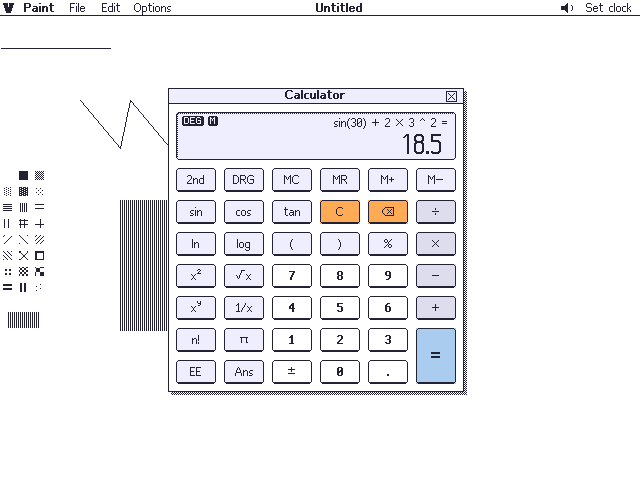
The display
The big number at the bottom right is the entry or the result. Above it is the calculation so far, for example sin(30) + 2 × 3 ^ 2 =. At the top left, small badges show the angle unit (DEG or RAD), 2nd when the second functions are on, and M when the memory holds a number.
Numbers show up to 9 significant digits. Very large and very small numbers are shown in scientific notation: 1.2345E+15 is 1.2345 times 10 to the power 15. A calculation that has no answer (dividing by zero, the square root of a negative number, the logarithm of 0, a number too large) shows Error; the next key starts afresh.
How it counts
The Calculator follows the usual rules of arithmetic: 2 + 3 × 4 = gives 14. Powers come first and work from the right (2 ^ 3 ^ 2 is 2 ^ 9 = 512), then × and ÷, then + and −. Brackets can go 8 deep; = closes any that are still open, and a number followed by ( multiplies: 2(3 + 4) is 14.
The functions work on the number shown: type 30, then sin, and the display shows 0.5. A function key after = works on the result.
The keys
Click the keys, or type them:
| Key | Type | Action |
|---|---|---|
| 0-9, . | 0-9, . | digits and the decimal point |
| + − × ÷ | + - * / (or x) | add, subtract, multiply, divide |
| x^y | ^ | power |
| ( ) | ( ) | brackets |
| = | = or Return | the result |
| C | c | clear everything (not the memory) |
| ⌫ | Backspace or Delete | erase the last digit; again, clear the entry |
| ± | n | change the sign (after EE: the exponent's sign) |
| % | % | percent: 200 + 10 % is 220, 50 % is 0.5 |
| EE | e | an exponent: 1.5 EE 7 is 15000000 |
| sin cos tan | s o t | sine, cosine, tangent |
| sin^-1 cos^-1 tan^-1 | S O T (Shift) | their inverses |
| ln | l | natural logarithm |
| e^x | L (Shift) | e to the power |
| log | g | logarithm to base 10 |
| 10^x | G (Shift) | 10 to the power |
| x^2 | q | square |
| √x | r | square root |
| 1/x | i | reciprocal |
| n! | ! | factorial of a whole number from 0 to 33 |
| π | p | pi |
| Ans | a | the last result |
| 2nd | f | the next of sin, cos, tan, ln, log works as its inverse |
| DRG | d | switch between degrees (DEG) and radians (RAD) |
| MC | K (Shift) | clear the memory |
| MR | k | recall the memory |
| M+ M− | m M (Shift) | add the number shown to the memory, or subtract it |
| Esc | close the Calculator |
The close box at the right of the title bar also closes it.
Angles
The Calculator starts in degrees: 30 sin is 0.5 and 0.5 sin^-1 is 30. In degrees, whole multiples of 90 give exact answers: 180 sin is 0 and 90 tan is an error. Press DRG for radians: π ÷ 2 = then sin gives 1.
Small screens
On the 640 x 240 and 320 x 240 screens the keys are lower, so the whole calculator fits in 240 lines.
This page is also in the wiki, and on the X16 (the desktop's Veranda > Help).