 Veranda
 Ask
Veranda Ask is a conversation with OpenAI's models on the X16. It uses your ChatGPT plan (ChatGPT Plus or Pro, through "Sign in with ChatGPT") or an OpenAI API key. It is Veranda Claude's sibling: the same window, keys, code blocks, attached files, chats and cost controls. Read Veranda Claude for those; this page covers what is different.
It needs the Wi-Fi modem with Zimodem's ATCS (see Network setup) and a set clock (see Date, time and time zone).
Sign in with ChatGPT (your plan)
The X16 has no web browser. So you sign in on a PC on your home network, and the PC hands the sign-in to the X16. The PC keeps no copy.
- Copy
PC/chatgpt_signin.pyfrom the card to a PC with a web browser and Python 3. Run it:python3 chatgpt_signin.pyIt prints a 6-digit code and the PC's address (port 8643).
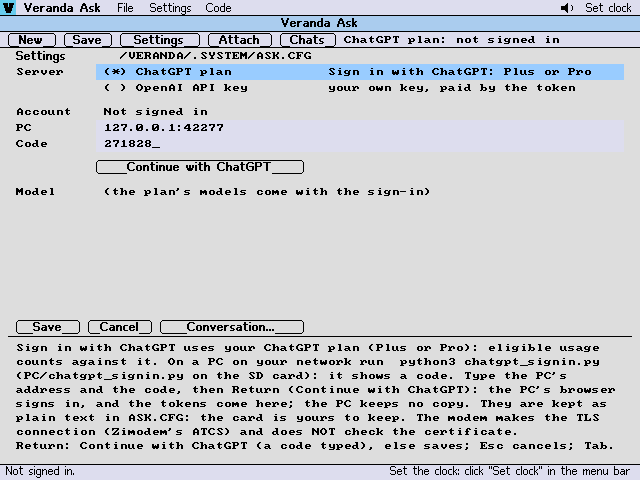
- In Veranda Ask: Settings, Server ChatGPT plan. Type the PC's address (for example
192.168.1.20:8643), Tab, the code, then Return (or click Continue with ChatGPT). The status bar says "Signing in: finish in the browser on your PC". - On the PC the browser opens OpenAI's sign-in page. Sign in and allow Veranda Ask. The X16 says "Signed in". The first time it shows the plan's notice: click Got it. The helper on the PC stops.
Or, with the X16's card in the PC:
python3 chatgpt_signin.py --card /path/to/the/card/VERANDAwrites the sign-in onto the card directly.
Notes:
- The code works for one sign-in. Five wrong codes stop the helper.
- Port 8643 on the PC must be open to the X16, and port 1455 must be free on the PC (for the browser's way back).
- During the sign-in the code and the credentials cross your home network as plain HTTP. Only home-network addresses may connect.
- Esc on the X16 cancels a sign-in.
While you use the plan
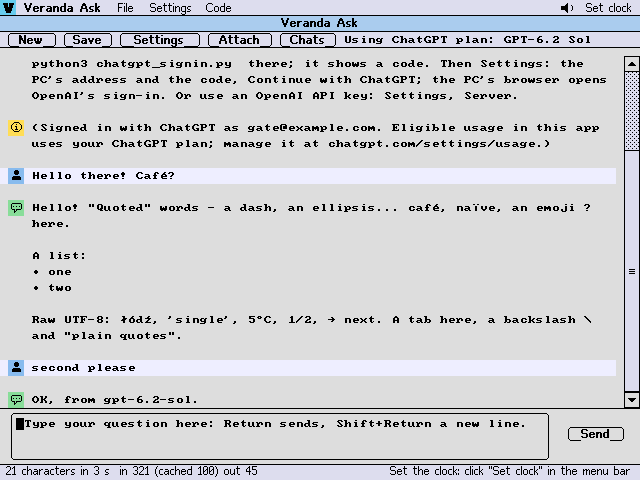
- The toolbar says "Using ChatGPT plan: <model>". The models are your plan's own list (up to 8); choose one in Settings.
- The status bar shows tokens only, no money. "Manage usage: chatgpt.com/settings/usage" (the X16 cannot open links).
- Usage counts against your ChatGPT plan's limits. When a limit is reached, Veranda Ask says "Usage limit reached ..." (no reset time is given).
- A plan other than Plus or Pro cannot be used: "Your ChatGPT plan can't be used in this app". Use an API key instead.
Renewal
A sign-in token lasts an hour. Veranda Ask renews it by itself, and saves the new tokens before it uses them. It needs a set clock (2026 or later) and the right time zone to know when a token expires. With an unset clock, the status bar says "Set the clock".
After 30 days without use, or when you sign out elsewhere, the sign-in ends: "The sign-in has ended: sign in again from your PC".
When the plan refuses: --check and ASK.LOG
If the plan refuses you ("The plan did not accept the sign-in (401). Kept."):
- Put the card in the PC and run (with your card's path in
C):C=/path/to/the/card python3 $C/PC/chatgpt_signin.py --card $C/VERANDA --checkIt signs in, then sends from the PC exactly the X16's own request ("Reply with OK") and a renewal, and says what happened, with OpenAI's error message. It never prints a token.
- "PC call OK": OpenAI takes the request; the X16's sending is the suspect. Report it with ASK.LOG.
- "PC call 401": shows OpenAI's reason.
- Look at ASK.LOG (
/VERANDA/.SYSTEM/ASK.LOG, at most 2.5 KB). It is written after every request: the last renewal and the last turn, the status, the important headers, an error's text, the X16's clock. It never holds a token or a cookie, so you can photograph it or copy it to a PC for a bug report.
An OpenAI API key instead
Settings, Server OpenAI API key: type or paste (Ctrl+V) the key (from platform.openai.com; paid by use), Tab, the model's name (gpt-6.2-sol at first). Or write a line key=sk-... in /VERANDA/.SYSTEM/ASK.CFG from a PC. With a key the status bar shows tokens only (OpenAI's prices are not in the program).
Your tokens on the card
The sign-in (the tokens) and the API key are kept as plain text in /VERANDA/.SYSTEM/ASK.CFG. The card has no file permissions: anyone with your card can use your plan until the tokens expire or you sign in again. Keep the card to yourself. To remove them: delete the access= and refresh= lines, or the whole file.
Help with another program's text
Another program can ask Veranda Ask to work on a piece of its text: rewrite it, shorten it, fix its grammar and spelling, translate it into English or Polish, summarise it, or answer a question about it. Veranda Write offers this in its AI menu, on the text you select (see its "AI help"). It uses your sign-in or API key from Veranda Ask: there is nothing else to set up, and the other program never sees them.
When a program asks, it goes aside and Veranda Ask starts with the request on the screen:
- The toolbar: Send, Cancel, and what is asked, with the model ("Rewrite - GPT-6.2 Sol").
- A note says who asks and what, and that the message goes to OpenAI only when you click Send.
- Below it, the message exactly as it will be sent: the task and the text.
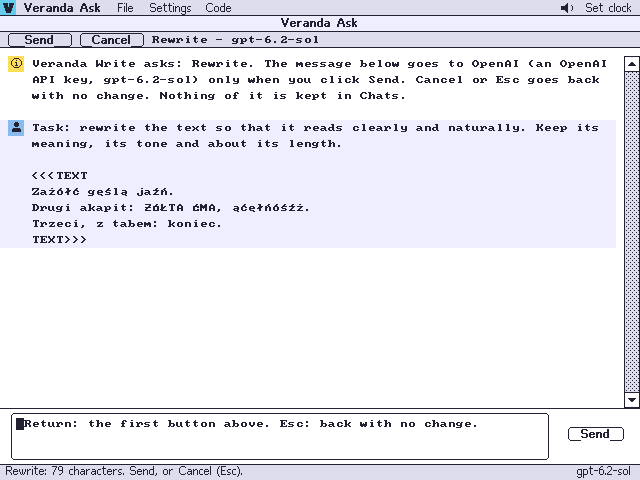
Send (or Return) sends it. Cancel (or Esc) goes back to the program with no change; nothing has left the X16.
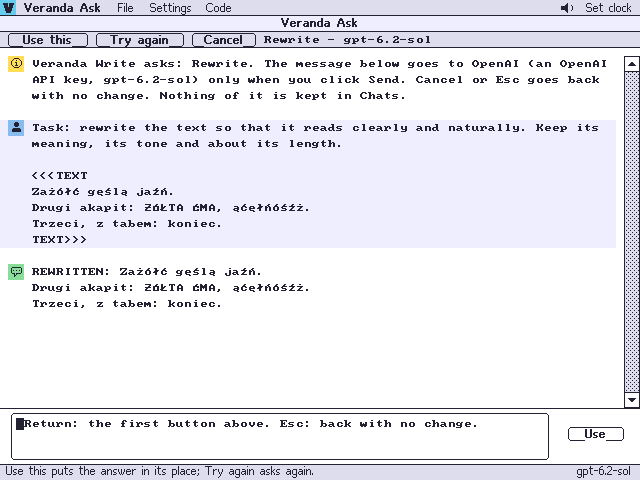
The answer appears as it comes. Read it, then:
- Use this (Return): the program gets the answer and comes back.
- Try again (T): the same request again; the new answer replaces the old one.
- Cancel: back to the program with no change.
Good to know:
- Up to 8,192 characters of text at a time. Select less if the program says it is too long.
- Polish letters go both ways.
- A request is not kept in Chats, and nothing else of your conversation goes with it. Your own system prompt and "short answers" do not apply to it.
- If Veranda Ask is not signed in (and has no API key), it says "Sign in in Veranda Ask first" and goes back; the program tells you so. Start Veranda Ask and sign in (above), then ask again. An access token that has expired is renewed by itself, as for any message.
- If the network card cannot be used, Veranda Ask says why and goes back: "No network card was found.", "The modem does not answer.", or "Not enough memory for the network card": a program put aside holds the memory. Quit one (Alt+Tab, then its Quit), or choose Roomy switching in Preferences, and ask again.
- The answer is the model's: read it before you click Use this.
Differences from Veranda Claude
- Chats are kept in
/DOCUMENTS/Chats/Ask. - An attached file can be up to 8 KB (the conversation keeps 24 KB).
- Compact uses the plan's cheapest model (one named "nano", else "mini"); with an API key, the one model you typed.
- The Settings menu has Sign-in, key and model...; Conversation..., Compact conversation (the models are chosen on the Settings page).
This page is also in the wiki, and on the X16 (the desktop's Veranda > Help).