 Veranda
 Update
Veranda Update brings Veranda on your SD card up to date over the network: from the GitHub releases of Veranda's public repository, or from your own package on a PC on your home network. It uses the Wi-Fi modem (see Network setup).
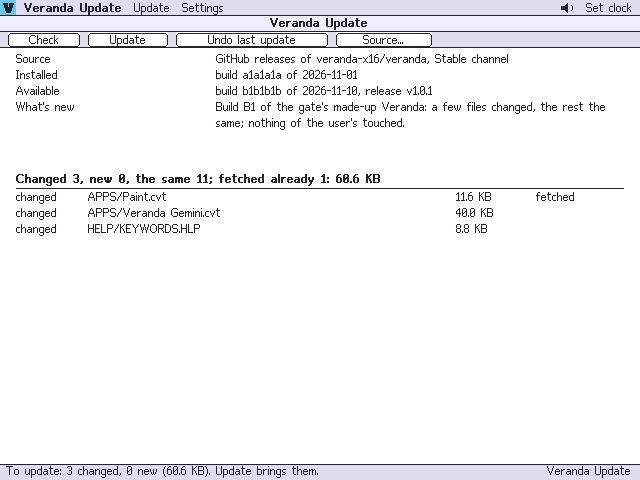
Use it
- Check (C): Veranda Update fetches the list of files of the newest build (
UPDATE.LST) and compares your card with it, file by file (size and CRC-32). It shows the build you have, the one available, "what's new", and every changed and new file with its size. "Up to date" when there is nothing to fetch. - Update (U): it fetches the files to
/VERANDA/.SYSTEM/UPD/and checks each one. Only when all have come and passed are the card's files replaced. Veranda's system files go last. - When a system file changed: Restart to finish. Veranda quits to BASIC, which starts Veranda again.
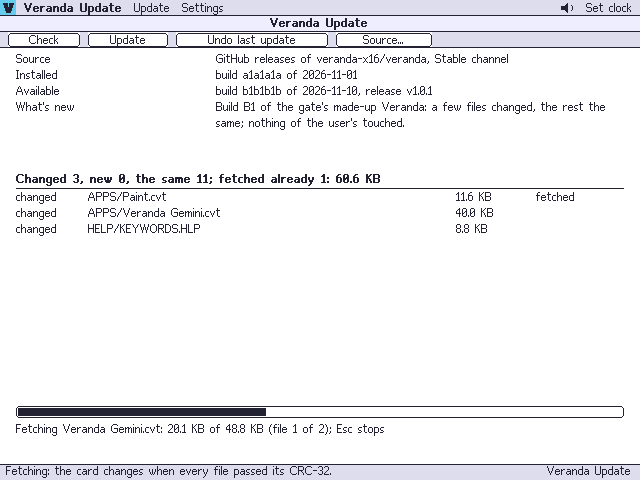
Ctrl+Q quits, as Quit does (a job running stops first).
If something goes wrong
- A dropped connection, Esc, or a file that fails its check stops the update, and the card is as it was. Update again goes on where it stopped: the files that came whole are kept.
- Alt+Tab puts it aside at any time; the file being fetched starts again when you come back.
- If the power goes off while files are replaced, Veranda Update finishes the job at its next start.
Undo
Undo last update puts back what the last update replaced, and removes what it added. The replaced files are kept in /VERANDA/.SYSTEM/OLD/<build>/. One undo is kept: the backup of the update before is deleted when a new one is made.
Dictionaries for Write
Dictionaries (D, also in the Update menu) checks the list of Veranda Write's spelling dictionaries instead of Veranda's: they are not part of Veranda's updates. They come from their own release, dict-1 of veranda-x16/veranda-write on GitHub, whatever Source... says. The window lists the dictionaries that are new or changed; Update then asks for each one (English, Polish), checks that the card has room, fetches the ones you chose, checks each file and puts them in /VERANDA/DICT. Undo last update removes them again. Veranda's own files and its build do not change.
Veranda Write's Tools > Get dictionaries opens Veranda Update this way by itself; when you Quit, Veranda Write comes back.
What it never touches
/DOCUMENTS(your files).- Your settings in
/VERANDA/.SYSTEM: settings files, chats, bookmarks, notes, preferences. - Any file the list does not name. A file that is no longer in the list is not deleted.
Source...
Choose where updates come from:
- GitHub releases:
owner/repo,veranda-x16/verandaat first (a card that saved the oldsandlbn/veranda-x16reads the new one). The modem makes the TLS connection (ATCS) and does not check the certificate. Each file's CRC-32 catches a cut or damaged file, but not a forged one. Only Veranda and its author's own MIT programs are published there. - A PC on my network: copy
PC/update_server.pyto a PC that has a Veranda package (a folder like the one you installed), and run:python3 update_server.py /path/to/the/packageThen type the PC's address with port 8644, for example
192.168.1.20:8644. Plain HTTP on your home network; only home addresses may connect. It serves the whole package, so never open its port to the Internet.
The choice is kept in /VERANDA/.SYSTEM/UPDATE.CFG. About this X16 shows the build installed.
This page is also in the wiki, and on the X16 (the desktop's Veranda > Help).