 Veranda
Date, time and time zone
The X16 has a battery-backed clock. Veranda shows its date and time at the right of the menu bar. When you set the clock in Veranda, it is written to the X16's clock, so it stays set after you turn the machine off.
Is the clock set?
A clock that was never set reads 1 January 2000. Then the menu bar says Set clock instead of the time. Some programs need a correct clock: Veranda Ask uses it to know when its sign-in must be renewed, and the chats and calendar use it for dates.
Set the date and time
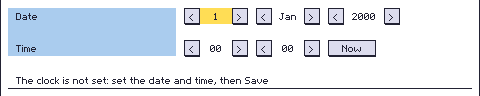
- Click the date and time (or Set clock) in the menu bar. This works in every Veranda program. Preferences opens, with the Date and Time rows marked.
- Change the values:
- click a value (day, month, year, hour or minute), or press Tab, to pick it. It turns yellow. Type digits: they fill the value and go on to the next one. For example, type
0945in the hour to set 09:45. A year can be typed as26or2026. - Up and Down step the picked value. Backspace starts it again.
- or use the < and > buttons.
A changed value is shown in the highlight colour until you save.
- click a value (day, month, year, hour or minute), or press Tab, to pick it. It turns yellow. Type digits: they fill the value and go on to the next one. For example, type
- Click Save (or press Return). Preferences sets the clock and shows what the clock now says, for example "Clock set to 21 Nov 2026 09:45". If you see "The clock did not take the time", try again.
Now puts the clock's current time back into the rows (it undoes your changes there). While you do not change them, the rows follow the clock.
The time zone
The X16's clock keeps your local time. The Time zone row in Preferences says how far your local time is from UTC (world time). It goes in steps of 15 minutes, from UTC-12:00 to UTC+14:00. Change it with < and >, then Save.
Veranda itself does not use the time zone to show the time. Programs that work with time from the network use it. For example, Veranda Ask works out UTC from your clock and the time zone, to know when a sign-in token expires.
Veranda does not change the clock for daylight saving time. Do it by hand twice a year: change the time zone and the clock.
Example: Oregon, USA
Most of Oregon uses Pacific Time.
| Period | Time zone in Preferences | The clock |
|---|---|---|
| Winter (Pacific Standard Time) | UTC-8:00 | local time |
| Summer (Pacific Daylight Time, from the second Sunday in March to the first Sunday in November) | UTC-7:00 | local time |
- In March: set the time zone to
UTC-7:00and move the clock one hour forward. Save. - In November: set the time zone to
UTC-8:00and move the clock one hour back. Save.
If the zone is wrong, the local time and the zone do not give the right UTC. Veranda Ask then may find that a fresh sign-in already looks expired. It then does not trust the clock, and renews the sign-in only when OpenAI asks for it.
The clock from the network
Term can set the clock from a time server on the Internet (Connection > Clock from network, through the Wi-Fi modem). Term has its own time zone setting for this (in Term's settings, key Z). Set it to your zone too.
Alarms
The Calendar desk accessory can ring an alarm at a time you choose, over any program, while Veranda runs.
This page is also in the wiki, and on the X16 (the desktop's Veranda > Help).