 Veranda
Files and folders
Veranda works with the files on the SD card directly. The card is FAT32, as on any PC.
Where things are
| Folder | What is in it |
|---|---|
/DOCUMENTS | your files. The desktop opens here. Programs save here first. |
/VERANDA/APPS | the programs and desk accessories |
/VERANDA | the system |
/VERANDA/.SYSTEM | hidden: settings, saved servers, bookmarks, the trash, chats' settings |
/VERANDA/FONTS, /VERANDA/WALLPAPERS, /VERANDA/HELP | fonts, desktop pictures, help |
Disk > Documents opens /DOCUMENTS again. The sidebar's places go to Veranda (/VERANDA), Apps (/VERANDA/APPS), Documents and Mods (your music folder, see below).
Long names
Veranda shows and keeps long file names, up to 63 characters, such as Letter to the garden club.cwr. Veranda's own programs open and save long names. Older GEOS programs only see names of up to 16 characters.
GEOS documents and programs are stored as .cvt files on the card (for example Paint.cvt). The desktop shows them without .cvt.
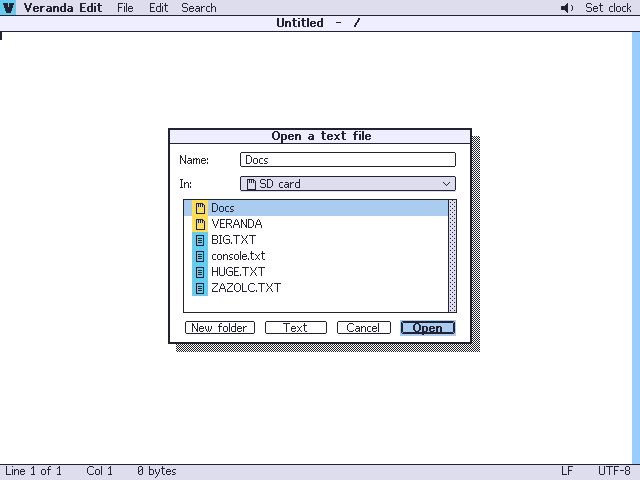
The standard Open and Save box
Veranda's own programs use the same box to open and save files. It shows the folders and files of one folder, with long names.
- Double-click a folder to go into it. Backspace goes up a folder (when opening).
- The In: pop-up lists the folders above, and Documents, Apps and the SD card.
- New folder makes a folder.
- A type button switches between the program's own files and All files.
- Up, Down, PgUp, PgDn, Home, End and the mouse wheel move the selection. When opening, typing a letter jumps to the next name with that letter.
- Return, the Open (or Save) button, or a double-click chooses. Esc or Cancel closes the box.
Select, open, rename
- Click an icon to select it. Select > First, Next, Previous, None also select.
- File > Open opens the selection (as a double-click does).
- File > Rename asks for a new name.
- File > Duplicate makes a copy in the same folder.
- File > Get info shows a GEOS file's icon, name, type, class, author, date and size. You can edit its description and click OK to save it.
Copy and move
- Drag a file onto the other window: it is copied there. Hold Ctrl or Shift while you drop to move it instead.
- Drag a file onto a folder's icon: it is moved into that folder. Hold Ctrl or Shift to copy instead.
- Drag a file onto the card's icon: it is copied to the card's top folder.
- While you drag, a see-through copy of the icon follows the pointer. Press Esc before you let go to drop it nowhere (nothing is copied or moved).
- Or select it and choose File > Copy or File > Move, go to another folder, and choose File > Put here. A copy into its own folder is named
Copy of ....
Whole folders can be copied and moved. A box shows the progress and has a Cancel button. If you cancel in the middle of a file, that file is deleted at the destination.
The trash
- File > Delete, or dropping a file on the trash icon, moves it to the trash (after a Yes). The trash is the folder
/VERANDA/.SYSTEM/TRASH. If a name is taken there, the file gets~2,~3... - Disk > Trash, or a double-click on the trash icon, shows what is in it. To get a file back, drag it out of the trash window.
- In the trash itself, Delete deletes for good.
- Disk > Empty trash deletes everything in it, for good. Disk Tools can also empty the trash.
Find
File > Find searches for file names from the folder shown down, through all its folders. Use * and ? as wildcards (case does not matter). Without them, any name that holds the text is found. Double- click a result to open it, or show it in its folder, selected.
The Search field in a window's toolbar only searches the folder shown.
Print to PDF
Veranda prints to PDF files, not to a printer. Drop a BMP picture (1, 4 or 8 bits a pixel, uncompressed, up to 640 x 480) or a Paint picture on the printer icon, or select it and choose File > Print. The PDF is written beside the picture, with the same name and .pdf (A4, 150 dots an inch). Copy it to a PC to print it on paper. Paint can also print with more choices: see Paint.
Other documents need their own program's printing. Veranda Write prints through PDF: File > Export as PDF (see Veranda Write), then print the PDF on a PC.
The Mods folder
The sidebar's Mods place is your music folder. It is /MODS at first. To use another folder, open it and choose File > Set as Mods folder. MOD Player starts there too.
The card
The card's icon shows the card's name. The window's status bar shows the free space. Disk Tools shows more, and can rename the card.
This page is also in the wiki, and on the X16 (the desktop's Veranda > Help).