 Veranda
Help on the X16
This manual is also on the SD card, as plain text, so you can read it on the X16 itself.
Open the manual
In the desktop choose Veranda > Help. View opens the manual's first page, Veranda manual.txt: how to move around, and the list of the manual's parts.
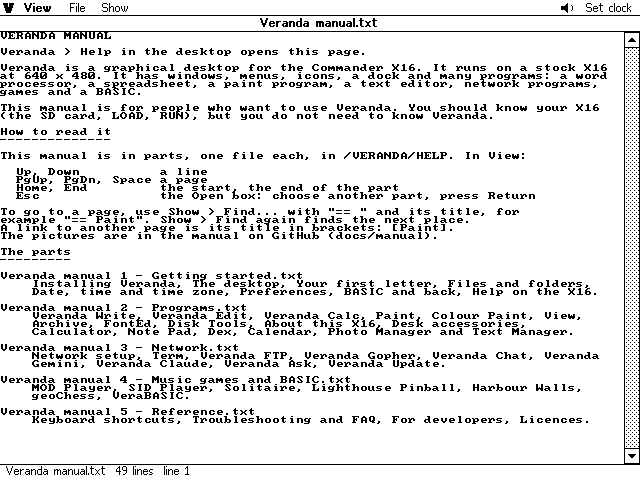
Move around
The manual on the X16 has a few parts, one file each, in /VERANDA/HELP:
| File | What is in it |
|---|---|
Veranda manual.txt | the start page and the contents |
Veranda manual 1 - Getting started.txt | installing, the desktop, your first letter, files, the clock, Preferences, BASIC |
Veranda manual 2 - Programs.txt | the pictures, system programs and desk accessories |
Veranda manual 3 - Network.txt | the Wi-Fi card and the network programs |
Veranda manual 4 - Music games and BASIC.txt | MOD Player, MIDI Player, SID Player, VIDKIT Player, the games, VeraBASIC |
Veranda manual 5 - Reference.txt | keyboard shortcuts, troubleshooting, developers, licences |
Veranda manual 6 - Writing and numbers.txt | Veranda Write, Veranda Edit, Veranda Calc |
In View:
| Key | Action |
|---|---|
| Up, Down | a line |
| PgUp, PgDn, Space | a page |
| Home, End | the start, the end of the part |
| Esc | the Open box with the manual's parts: choose another part and press Return |
To jump to a topic, use Show > Find...: for example, find == Paint to go to Paint's page (each page starts with == and its title). Show > Find again finds the next place.
The text version has no pictures. Links to other pages appear as their title in brackets, for example [Paint].
VeraBASIC's help
VeraBASIC has its own help with links between pages: press F1 in the VeraBASIC editor. See VeraBASIC.
If Help does not open
- "View is not with the applications.": View is missing from
/VERANDA/APPS. Copy it from the package. - View says "Veranda manual.txt ... cannot be opened": the files are missing from
/VERANDA/HELP. Copy that folder from the package. - "Not enough memory": quit a program you put aside (right-click it in the dock, Quit), then try again.
This page is also in the wiki, and on the X16 (the desktop's Veranda > Help).