 Veranda
 Chat
Veranda Chat is an IRC client. IRC (Internet Relay Chat) is chat in channels (#name) and private conversations, on one server at a time. It works through the Wi-Fi modem (see Network setup).
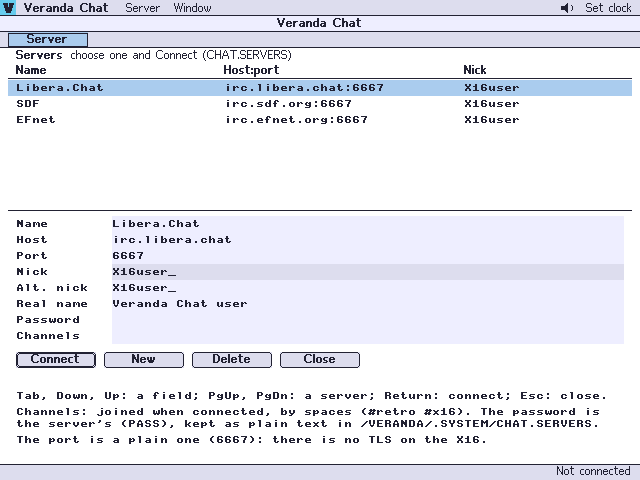
Connect
Server > Servers... (shown at the start) lists your servers. The selected one's fields: name, host, port, nick, an alternative nick (used when your nick is taken), real name, password (the server's: for a bouncer, or a registered nick where the server takes it so) and the channels to join, such as #retro #x16.
- Tab, Down and Up move between the fields. PgUp and PgDn choose a server.
- Connect (or Return, or a double-click) connects. It is the default button: its frame is thicker.
- New and Delete add and remove a server. Esc closes the page.
The first time, the list has Libera.Chat, SDF and EFnet.
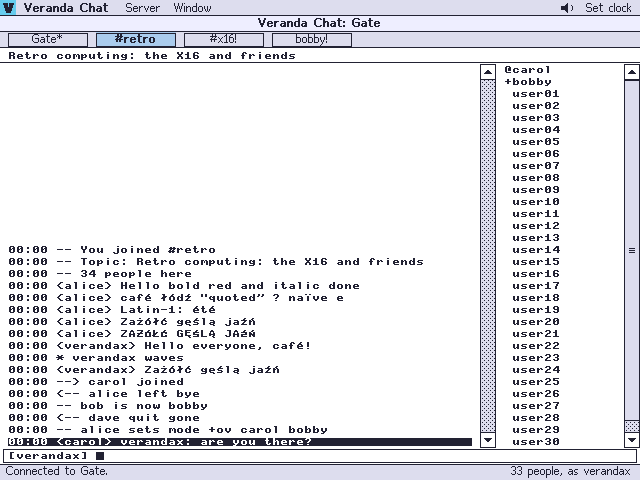
The window
- The tabs at the top: the server's window, then up to six channels and private conversations. Click one, or press F1-F7, Ctrl+N (next), Ctrl+P (previous).
*after a name: new lines.!: a line that names you, or a new private message. A name in brackets is a channel you are no longer in. - The topic under the tabs.
- The text, with the time of each line (Window > Times on/off). A line that names you is shown reversed, with a sound. Its scroll bar is at its right: an arrow scrolls a row, a click on the track a page.
- The nick list at the right of a channel: operators (
@), voices (+), then the others. Click a nick to put it in the input line. It has its own scroll bar. Window > Nick list on/off. - The input line at the bottom, in a frame.
- The status bar: what happened at the left; the connection and the people in the channel at the right.
Menus
| Menu | Items |
|---|---|
| Veranda Chat | About Veranda Chat; Quit (Ctrl+Q) |
| Server | Servers...; Disconnect |
| Window | Next (Ctrl+N), Previous (Ctrl+P), Close (Ctrl+W); Nick list on/off, Times on/off; Clear |
The menus show their keys at the right.
Keys
| Key | Action |
|---|---|
| Return | send the line |
| Left, Right, Home, End, Backspace, Delete | edit the line |
| Up, Down | the last 8 lines you sent |
| Tab | complete a nick of the channel (again: the next one) |
| Ctrl+V | paste the clipboard's first line |
| PgUp, PgDn, wheel, the scroll bar | scroll back |
| End, Esc | back to the newest lines |
| F1-F7, Ctrl+N, Ctrl+P | change tab |
| Ctrl+W | close the tab |
| Ctrl+Q | quit (asks first when you are connected) |
Commands
| Command | Does |
|---|---|
/join #channel [key] | join a channel |
/part [reason] | leave the channel |
/msg nick text | a private message |
/query nick [text] | open a tab for a private conversation |
/me action | an action (* nick action) |
/nick new | change your nick |
/topic [text] | show or set the topic |
/notice nick text | a notice |
/raw line (or /quote) | send a line to the server as it is |
/close | leave a channel or close a conversation |
/clear | clear the window |
/quit [reason] | disconnect |
/help | the commands |
Other commands are sent as they are (/whois nick, /away ...). //text sends a line that starts with /.
Characters
IRC's bold and colours are taken out. UTF-8 is decoded: Latin-1 letters (é, ü, ñ) are shown; other European letters as their base letter (ł as l); other scripts as ?. What you type is sent as UTF-8.
Saved servers: CHAT.SERVERS
/VERANDA/.SYSTEM/CHAT.SERVERS, one server per line:
name,host,port,nick,alternative nick,real name,password,channelsUp to 8 servers. The password is kept as plain text.
Limits
- Port 6667, no TLS: servers that need TLS or SASL cannot be used. No DCC.
- One server; the server's window and 6 channels or conversations.
- Each window keeps about 50 lines (4 KB). A channel lists 190 people at most; the list's last row says how many more there are ("and 2209 more"), and the status bar counts everyone.
- Pasting many lines fast may get you disconnected for flooding.
Alt+Tab keeps the connection: what arrives meanwhile comes in when you come back. If you are away long, the server may drop you.
This page is also in the wiki, and on the X16 (the desktop's Veranda > Help).