 Veranda
 Edit
Veranda Edit is a plain text editor. Use it for text files: notes, lists, BASIC listings, configuration files, README files. It keeps a file exactly as it is: no fonts, no styles. For letters and documents with styles, use Veranda Write.
Start it
- Double-click Veranda Edit in
/VERANDA/APPS. - Double-click a
.TXTfile: Veranda Edit opens it.
The window
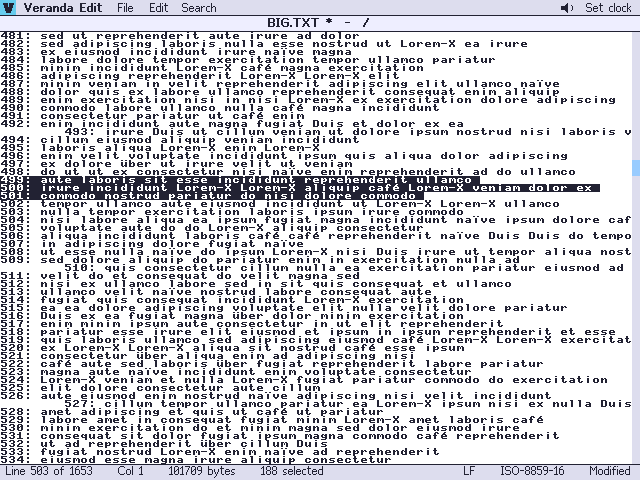
The menu bar; a title bar with the file's name and folder; the text in 79 columns and 54 lines; a scroll bar; and a status bar: at its left the line, the column, the size and the selection, at its right the kind of line ends, the encoding and "Modified" (or a short message, until the next key). The menus show each command's key at the right.
Features
- Plain text in Veranda's character set (ISO-8859-16) or in UTF-8. A UTF-8 file whose characters are all in the set is shown with them and saved as UTF-8 again; File > Encoding (Ctrl+E) switches how the text is saved. Any other file is kept byte by byte.
- Line ends LF, CR LF or CR: the file keeps the kind it had.
- Files up to about 330 KB on a 512 KB X16. The text is kept in RAM banks.
- Select with the keys (Shift and a move) or with the mouse (drag).
- Undo.
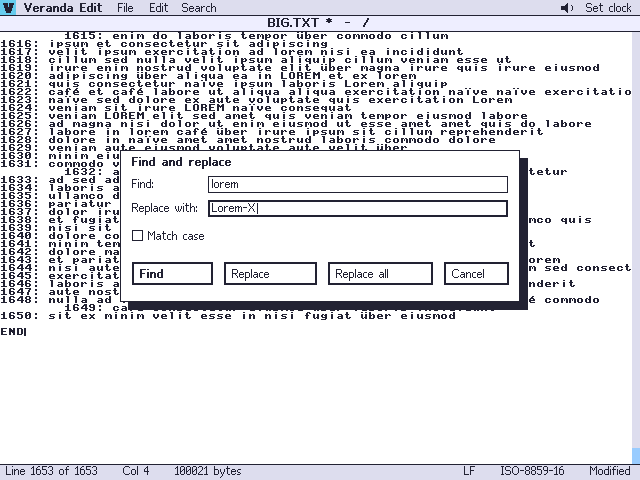
- Find and replace, find next, go to line.
- Cut, copy and paste through Veranda's clipboard, so text moves to and from other programs.
Menus
| Menu | Items |
|---|---|
| Veranda Edit | About Veranda Edit, Desk accessory... |
| File | New, Open..., Save, Save as..., Encoding, Quit |
| Edit | Undo, Cut, Copy, Paste, Select all |
| Search | Find and replace..., Find next, Replace, find next, Go to line... |
Keys
| Key | Action |
|---|---|
| Arrows | move; with Shift: select |
| Ctrl+Left, Ctrl+Right | a word left, right |
| Home, End | start, end of the line |
| Shift+Home | select to the start of the line |
| PgUp, PgDn | a page up, down |
| Ctrl+PgUp (or Ctrl+Home), Ctrl+End | start, end of the file |
| Backspace, Delete | delete left, right (or the selection) |
| Return | a new line |
| Tab | a tab character |
| Esc | remove the selection |
| Ctrl+N, Ctrl+O, Ctrl+S | New, Open, Save |
| Ctrl+Shift+S | Save as |
| Ctrl+E | the encoding the text is saved in |
| Ctrl+Q | Quit |
| Ctrl+Z | Undo |
| Ctrl+X, Ctrl+C, Ctrl+V, Ctrl+A | Cut, Copy, Paste, Select all |
| Ctrl+F | Find and replace |
| F3 | Find next |
| Ctrl+R | Replace, then find the next |
| Ctrl+L (or Ctrl+G) | Go to line |
| Alt + the same letters | the same as Ctrl |
Files
- Open and Save use Veranda's standard box (see Files and folders). The first Open and Save go to
/DOCUMENTS. - While saving, Veranda Edit writes
~VEDIT.TMPfirst. If a save is cut short (for example the power goes off), this file may be left on the card. It may hold your text: open it in Veranda Edit before you delete it. Disk Tools can find and delete such files.
Limits
- About 330 KB of text on a 512 KB machine.
- One file at a time.
- No redo.
This page is also in the wiki, and on the X16 (the desktop's Veranda > Help).