 Veranda
The desktop
The desktop is the first thing you see. It shows your folders in windows, starts programs and opens documents. Veranda calls it the shell.
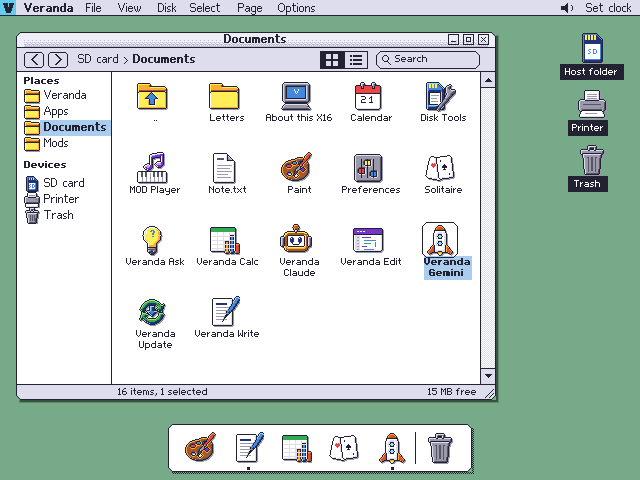
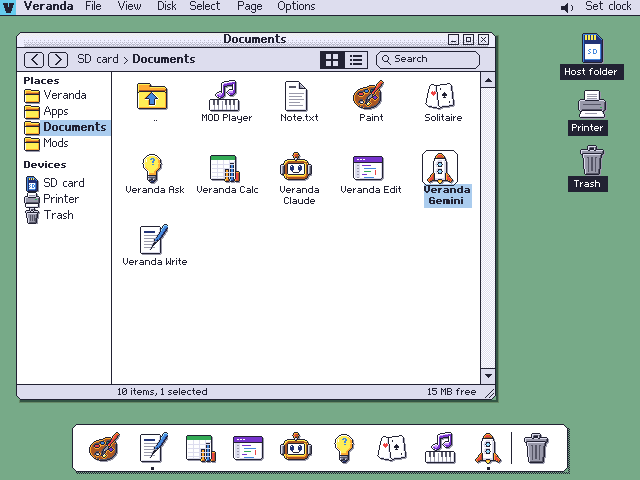
The parts of the screen
- The menu bar at the top: the menus at the left. At the right: the speaker and the date and time.
- Folder windows. One or two at a time.
- The desktop icons at the right: the card, the printer and the trash.
- The dock at the bottom, when it has something in it: your favourite programs (pinned), programs you put aside, and windows you minimised.
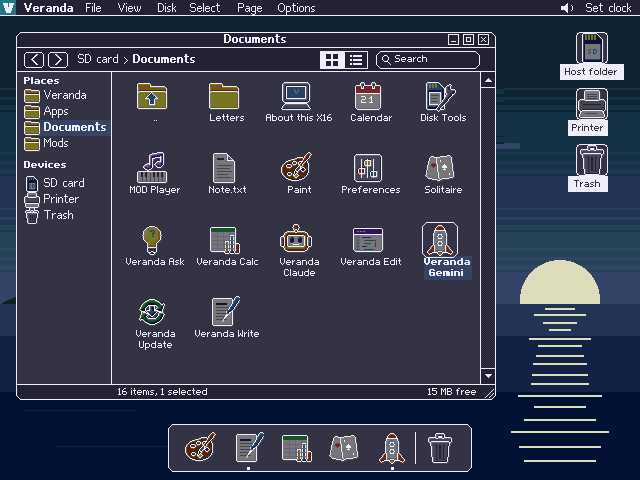
- The background behind it all: the plain colour, a picture or a pattern. Veranda comes with four pictures: Dusk, Still Water, Low Hills and Sunroom Tiles. Choose one in Preferences, the Desktop page.
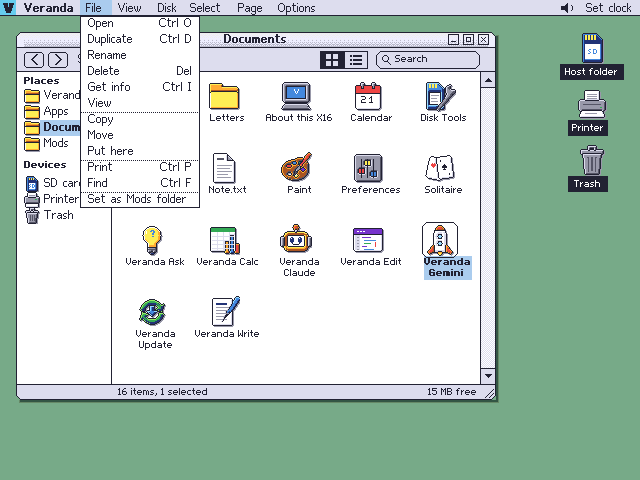
The menu bar
| Menu | Items |
|---|---|
| Veranda | About the shell, Desk accessory (open a desk accessory: see Desk accessories), Help (this manual, see Help on the X16) |
| File | Open, Duplicate, Rename, Delete, Get info, View, Copy, Move, Put here, Print, Find, Set as Mods folder |
| View | By icon, By small icon, By name, By size, By date, By type, Refresh, Up a folder |
| Disk | Open the card, New window, Close window, Trash, Empty trash, Documents |
| Select | First, Next, Previous, None |
| Page | Next page, Previous page |
| Options | 640 x 480, 640 x 240, 320 x 240, Preferences..., Pin to the dock, Unpin, BASIC (keep Veranda), Quit Veranda |
The menu bar's right side works in every Veranda program:
- Click the date and time to open Preferences at the Date and Time rows. If the clock was never set, the bar says Set clock instead.
- Click the speaker to open a small volume slider with Mute. Click outside it, or press Esc or Return, to close it.
See Date, time and time zone and Preferences.
The desktop's keys (Alt+Tab works everywhere: see below):
| Key | Does |
|---|---|
| Ctrl+O | Open the selected item |
| Ctrl+D | Duplicate it |
| Del or Ctrl+Backspace | Delete it (to the Trash) |
| Ctrl+I | Get info |
| Ctrl+P | |
| Ctrl+F | Find |
| Ctrl+R | Refresh the window |
| Ctrl+Up | Up a folder |
| Ctrl+N | A new window |
| Ctrl+W | Close the window |
| Home, Tab, Shift+Tab | Select the first, next or previous item |
| Esc | Select nothing |
| PgDn, PgUp | The next or previous page |
| F1 | Help |
| Ctrl+Q | Quit Veranda |
The menus show these keys at the right of their items.
A folder window
From the top:
- The title band shows the folder's name. At the right are three square boxes: minimise (the window goes to the dock), zoom (full size and back) and close. Drag the title band to move the window.
- The toolbar: back and forward; the path (click a folder in it to go there); the icons / list toggle; the Search field.
- The sidebar: the places Veranda, Apps, Documents and Mods, and the devices: the SD card, the printer and the trash. Click a place or the card or the trash to go there. Click the printer to see how to print.
- The contents: the folder's files and folders.
- The scroll bar at the right: the arrows move the contents a row up or down; a click on the dotted track above or below the thumb moves a page. The thumb shows where you are and how much of the folder fits. Drag the thumb to go to a place. With everything in view there is no thumb.
- The status bar: the number of items, the selection, the free space on the card. Drag the corner at the right to resize the window.
The Page menu (Page Down, Page Up) also moves a page. A mouse wheel scrolls the front window when the pointer is over it: three rows a notch in the list, a row of icons a notch in the icons.
Icons and the list
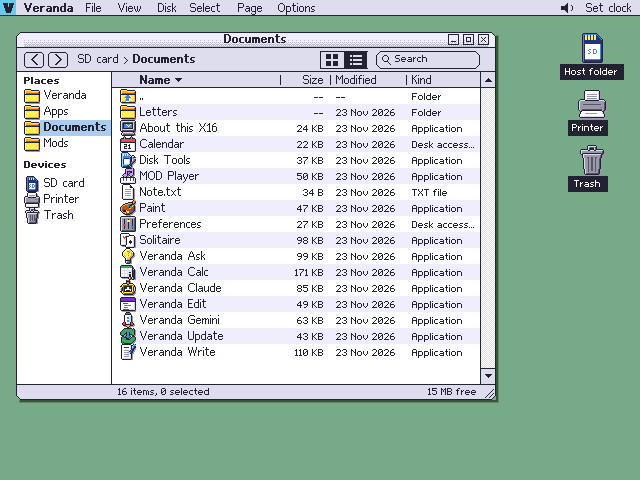
A folder window opens as a list until you choose otherwise; the toolbar's two buttons switch between the list and the icons, and the window keeps your choice. View > By icon shows large colour icons. By small icon shows small ones. By name, By size, By date and By type show a list, sorted, with a small icon before each name. In the list, click a column header (name, size, modified, kind) to sort by it. The sorted column's header is bold, with a small triangle.
Opening things
- Double-click a program to start it.
- Double-click a folder to open it in the same window. The
..icon goes up a folder. - Double-click a document to open it with its program. Veranda finds the program by the file's extension, in the folder shown, then in
/VERANDA/APPS,/VERANDAand the top folder. Some examples:
| Extension | Opens with |
|---|---|
.CWR | Veranda Write |
.TXT | Veranda Edit |
.X16S, .XLSX, .ODS, .CSV | Veranda Calc |
.BMP | View |
.MOD | MOD Player |
.MID, .MIDI, .ZSM | MIDI Player |
.SID | SID Player |
.SPV, .WAV, .ZCM | VIDKIT Player |
.D64, .D71, .D81 | Archive |
.TEL | Term |
.BAS | VeraBASIC |
A GEOS document (a .cvt file, such as a Paint picture) opens with the program that made it.
- Double-click an X16 program (a
.PRGfile, such as a game for the X16's BASIC) to run it. Veranda asks first, goes to BASIC, runs the program in its own folder and comes back to the desktop by itself when the program ends. See BASIC and back. These files have their own icon: a BASIC screen with a play mark. - File > View opens the selected file in View, whatever it is.
Search
Click the Search field and type a part of a name. The window shows the names that hold it. For a search through all folders, use File > Find (see Files and folders).
Two windows
Disk > New window opens a second window. Drag files from one window to the other to copy them. See Files and folders.
The desktop icons
- The card opens the top folder of the SD card.
- The printer: drop a BMP picture or a Paint picture on it to print it to a PDF file. See Files and folders.
- The trash: drop files on it to delete them. Double-click it to see what is in it.
The dock and Alt+Tab
Alt+Tab puts the program you are using aside. The whole program is kept in RAM, with its document and its screen, and the desktop comes back. The program now has an icon in the dock with a dot under it. Click the icon and the program comes back exactly where you left it.
The dock shows:
- the pinned programs, your favourites (one click starts one, or brings it back if it is aside);
- the programs that are aside (with a dot);
- the windows you minimised (a folder icon; a click opens the window again);
- after a line, the trash: click it to see what is in it, or drop files on it to delete them.
Your favourite programs in the dock
The dock keeps up to 10 pinned programs, in the order you choose. A new Veranda starts with Veranda Write, Veranda Edit, Paint, Veranda Gemini, Veranda Ask and Term pinned (those that are in /VERANDA/APPS). Your pins and their order are kept on the card and come back after a restart.
- Pin a program: drag it from a window onto the dock and let go where you want it, between two icons. You can also drop it on an empty part of the desktop (it goes at the end), or select it and choose Options > Pin to the dock.
- Move a pin: drag its icon along the dock to another place.
- Unpin: drag the icon off the dock, or onto the dock's trash. The program itself stays where it is; nothing is deleted. Options > Unpin removes the last pin.
- One click on a pinned icon starts the program. If it is aside (a dot under it), the click brings it back where you left it.
- Full: with 10 pins, Veranda says "The dock is full: unpin a program first." When pins, programs aside and minimised windows are more than fit, the icons move closer together. At 320 x 240 fewer fit.
- Preferences has a Dock page for the same list: Add..., Remove, Move up, Move down, then Save. See Preferences.
Right-click an icon in the dock for a small menu: Quit (a program that is aside: it is closed and its unsaved work is lost; you are asked first), Unpin, or Restore (a minimised window).
Things to know:
- Up to 8 programs can be aside at once.
- On a 512 KB or 1 MB machine Veranda puts a program onto the SD card when RAM is not enough for it ("Putting ... aside... 120 KB" at the top of the screen), in
/VERANDA/.SYSTEM/TASKS, and reads it back when you click its icon ("Bringing back ..."). That takes a few seconds, but programs may use nearly all the memory. Preferences' Video mode, switching row chooses: card (Roomy) or RAM only (Fast, the default with 2 MB). - If the card is full, Veranda says "Not enough room on the card to put it aside." and the program goes on. If a program was on the card when the power went off, its file is deleted at the next start.
- With RAM only, if there is not enough memory, Veranda says "No memory to put it aside." and asks "Quit it, losing its work?". Answer No and save your work first.
- A program that has a file open at that moment cannot be put aside now. Veranda asks the same question. Try again a moment later.
- Network programs keep their connection while they are aside. The modem holds what arrives.
Desk accessories
Desk accessories are small programs that open over the program you are using: Calculator, Note Pad, Dex, Calendar, Preferences, Photo Manager and Text Manager. In the desktop, choose Veranda > Desk accessory. In most other programs, the first menu (the program's own name) has Desk accessory.... You can also double-click one in /VERANDA/APPS. See Desk accessories.
Video modes
Options > 640 x 480 is the normal mode. 640 x 240 and 320 x 240 exist for older GEOS programs. Preferences can set the mode Veranda starts in. The colour icons show in every mode; a wallpaper picture shows at 640 x 480 only, and the other modes show the plain desktop colour instead.
Other GEOS programs
Veranda uses the classic GEOS programming interface. GEOS programs whose source code is available can be ported to it, and some have been. Veranda does not run C64 GEOS program files directly. Ports that are not part of this manual are not described here.
Leaving the desktop
- Options > BASIC (keep Veranda) goes to BASIC and keeps Veranda in memory. See BASIC and back.
- Options > Quit Veranda leaves Veranda completely.
If a program crashes
If a program stops with an error, Veranda shows a box with the program's name, what happened ("It ran into a BRK at $...") and where. Click OK: the desktop comes back. The program's unsaved work is lost. See Troubleshooting.
This page is also in the wiki, and on the X16 (the desktop's Veranda > Help).