 Veranda
About this X16
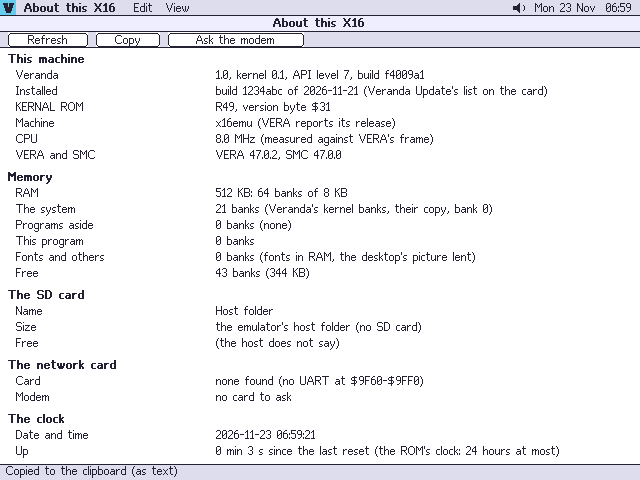
About this X16 shows what your machine is and how it is doing, in one window. Use it for a quick look, or to copy the facts into a bug report.
Start it
Double-click About this X16 in /VERANDA/APPS.
What it shows
- This machine: Veranda's version and build (and the build installed by Veranda Update); the KERNAL ROM's release (R49 ...); the machine (the Commander X16, or the emulator); the CPU's speed, measured; VERA's version and the SMC's firmware.
- Memory: the RAM (512 KB is 64 banks of 8 KB); the system's part; the programs put aside with Alt+Tab, each with its banks; this program's; the rest in use; the free banks.
- The SD card: its name, the size, the free space.
- The network card: the serial port where TexElec's card is (
$9FE0from the factory), or none. Nothing is sent to the modem until you click Ask the modem. Then it sendsATandATIonly and shows the firmware's line (Zimodem's version). Esc stops it. - The clock: the date and time, and the time since the last reset.
The clock, the memory and the time since reset are updated every second.
Buttons and keys
| Button | Key | Action |
|---|---|---|
| Refresh | R | read everything again |
| Copy | C (or Edit > Copy all) | put all the facts on the clipboard as text, to paste into a bug report (in Veranda Edit, Note Pad ...) |
| Ask the modem | ask the modem its version |
Ctrl+Q quits. The menus show each item's key at the right. Alt+Tab puts it aside at any time.
A hardware check
What a stock X16 should show:
- KERNAL ROM R49 (or your release); Machine "Commander X16"; CPU about 8.0 MHz; VERA 0.3.x; the SMC's version (or "the SMC does not say").
- RAM 512 KB: 64 banks, 44 for programs with nothing aside.
- Put a program aside with Alt+Tab and open About again: it is listed with its banks.
This page is also in the wiki, and on the X16 (the desktop's Veranda > Help).