 Veranda
FontEd
FontEd (the Font Editor) edits GEOS fonts: the fonts in /VERANDA/FONTS that Veranda's programs use. You can change letters, make a letter wider or narrower, move the baseline, and make a new size from an existing one.
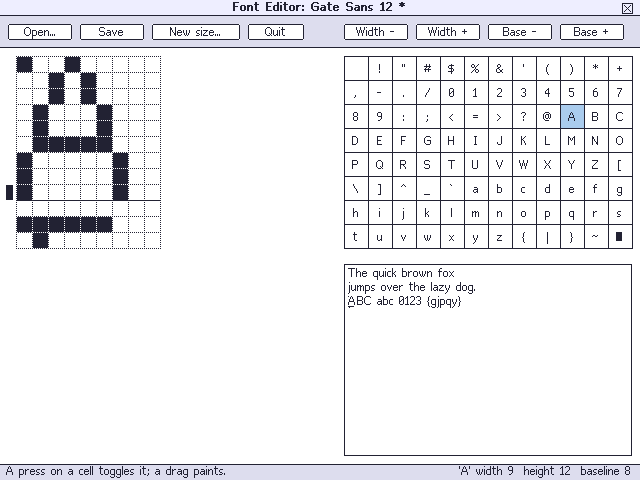
Start it
Double-click FontEd in /VERANDA/APPS. It works in /VERANDA/FONTS.
The screen
- The title bar shows the font, its size, and a * when it has changed. Its close box quits, as Quit does.
- The buttons in the toolbar: Open, Save, New size, Quit; Width - + and Base - +.
- On the left, the letter in a large grid. The baseline row is marked.
- On the right, the 96 characters of the font. Click one to edit it.
- A preview in the font you edit, under the characters.
- The status bar at the bottom: a hint at the left, and the character's figures (its width, the height, the baseline) at the right.
How to edit
- Click a cell in the grid to turn it on or off. Drag to paint: all cells you drag over get the value the first cell got.
- Width - takes a column from the letter's right side. Width + gives it one more.
- Base - and Base + move the baseline.
- New size asks for a point size. It scales the current size to it (nearest pixel). Then you edit the new size.
- Open shows the font picker: a font and a size.
- Save writes the font file.
Files
Save writes a new file Name.tmp first, then deletes Name.cvt and renames the new file. So there is always a good font file. If a save is cut short, a Name.tmp may be left beside the font: Disk Tools can delete it. After a save, every program sees the new font.
Tip
Keep a copy of a font before you change it.
This page is also in the wiki, and on the X16 (the desktop's Veranda > Help).