 Veranda
MIDI Player
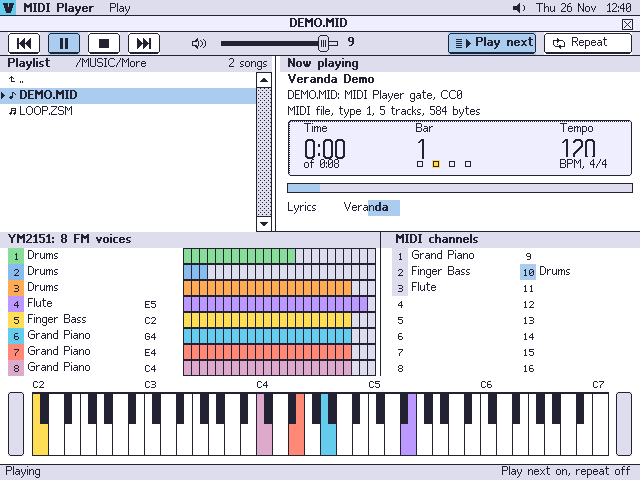
MIDI Player plays MIDI files (.MID, .MIDI) on the X16's YM2151 sound chip and ZSM files (.ZSM, the X16's own music format, from Furnace and other trackers) on the YM2151 and VERA's sound generator. The music keeps playing while menus and boxes are open and while the window is drawn, and the window shows it as it plays: a keyboard whose keys light up in each voice's colour, a meter for every voice, the instruments, the bar and beat, the lyrics. Version 1.1. Its MIDI engine is MooingLemur's Melodius, its ZSM engine MooingLemur's ZSMKit; the window is Veranda's. MIT licence.
It is in /VERANDA/APPS as MIDI Player.cvt.
Start it
- Double-click a
.MID,.MIDIor.ZSMfile: MIDI Player plays it, with its folder as the playlist. - Or double-click MIDI Player in
/VERANDA/APPS: it opens in the folder you were in (in/DOCUMENTSwhen that was a folder of Veranda's own), and you go to your music in its playlist.
The window
- The toolbar: Previous, Play (Pause while a song plays), Stop and Next as keys with their signs; the volume as a slider from 0 to 10 (click or drag it; the number is at its right; the speaker is crossed out at 0); Play next and Repeat, each lit while it is on. A key you click or type flashes.
- The playlist (top left): the folder's folders, then its MIDI files (a note) and ZSM files (two notes),
..to go up. Double-click a song to play it, a folder to open it. The song playing is marked and bold. - Now playing (top right):
- the song's title: a MIDI file's own name for itself (its first track's name) when it has one, else the file's name; under it the file's name and its text (the copyright, or the first words the file starts with); then its kind (a MIDI file's type and tracks; a ZSM's tick rate and whether it loops) and its size;
- the display: the time played in big digits and the song's length under it ("of 3:10"); for MIDI the bar and a light for every beat of the bar, the beat now lit (the bar's first beat orange, the others yellow), and the tempo in beats a minute with the time signature; for ZSM how many times round it has played and its tick rate;
- the progress bar (by the time when the length is known, else by how far into the file it is). Click it: the status bar says the time at that point. MIDI Player plays a song from its start: it cannot jump to a point;
- the lyrics (a MIDI file's lyrics or text events) as they come, the newest syllable bold on the highlight.
- The voices (below):
- YM2151: its eight FM voices, each in a colour of its own (the number at the left), with its instrument (the General MIDI name, Drums for channel 10; for ZSM the sides it sounds on), the note it plays, and a meter that jumps when a note starts (by how loud it is), sinks slowly while the note is held and falls when it ends;
- at the right, for MIDI the 16 MIDI channels: each one's instrument once it plays, its number lit while its notes start; for ZSM the PSG's 16 voices, each with its note and a meter of its volume.
- The keyboard (the bottom): 61 keys, C2 to C7. A key lights up in the colour of the voice playing it (the same colour as the voice's number and meter). A note above or below the keyboard is shown an octave or more in. Drums are not keys. In dark mode the keys keep their look: white keys light, black keys dark.
- The status bar: Playing, Paused, Stopped, Loading... or what went wrong on the left; Play next and Repeat on the right.
Menus
| Menu | Items |
|---|---|
| MIDI Player | About MIDI Player..., Quit |
| Play | Play or pause, Stop, Next, Previous, Volume up, Volume down, Play next: on/off, Repeat: on/off |
Keys
| Key | Action |
|---|---|
| Space | play or pause (stopped: play the song chosen) |
| Esc | stop |
| Right | the next song |
| Left | the previous song |
| + (or =), - | the volume up, down |
| N | Play next on or off |
| R | Repeat on or off |
| Up, Down | move the selection |
| PgUp, PgDn | move the selection 9 rows |
| Home, End | the first, the last entry |
| Return | open the folder, or play the song |
| Backspace | up a folder |
| Ctrl+Q or Alt+Q | quit |
The mouse: the toolbar's keys and its volume slider (click or drag), the playlist (double-click), the scroll bar, the wheel (3 rows), the progress bar (the time at that point), the close box.
Play next, Repeat, the volume
- Play next (on at first): when a song ends, the next one in the list plays. After the last song it stops.
- Repeat (off at first): the same song plays again when it ends. A ZSM that loops goes on looping.
- A ZSM that loops is played once round, then faded out, unless Repeat is on.
- Next and Previous (the buttons, the keys) wrap at the ends of the list. A song that does not load is passed over, and its error shown.
- The volume goes from 10 (full) to 0 (silent), 3 dB a step: the slider, the + and - keys, the Play menu. It stays as set for the next songs.
Alt+Tab and quitting
- Alt+Tab pauses the music: a program put aside does not run, so it cannot play. When you come back to MIDI Player, the song goes on from where it was.
- Quit (the close box, Ctrl+Q) stops the music and silences every YM2151 channel and every voice MIDI Player used.
How MIDI sounds
- MIDI files of type 0 and type 1 play, with up to 32 tracks and ticks per quarter note (not SMPTE time).
- The instruments are the General MIDI sounds of the X16's ROM, on the YM2151's eight channels; channel 10's notes are the ROM's drums. A song with more than eight notes at once has some notes cut short or left out, the oldest first.
- Notes, program changes, volume (controller 7), pan, the sustain pedal, the modulation wheel, pitch bend and its range, tempo and time signature changes are played; aftertouch and SysEx messages are skipped.
- A note held when you pause is not sounded again when you go on: the song goes on with its next notes.
Notes and limits
- A song is read whole into the RAM banks: on a 512 KB X16 up to about 280 KB, more with more memory. A larger one says "Too big for the free memory".
- A ZSM song may use all sixteen PSG voices; voices 14 and 15 are also Veranda's system sounds'. A system sound (a beep) while a ZSM plays takes them for its length, and the song's notes on them come back with their next note.
- It does not open
.ZCMfiles (sampled sound): VIDKIT Player plays those. - It plays on the X16's own sound chips; it does not send MIDI to a MIDI card.
- Up to 255 entries in the playlist. A name longer than 62 characters is listed but cannot be played.
- The song's length is worked out when it starts, by reading it through; a MIDI file larger than 96 KB is not read through, and its length is not shown (the progress bar then goes by the file).
- The display, the meters and the keyboard are drawn up to 20 times a second, only where something changed; the music itself never waits for them.
Credits
The MIDI engine is Melodius's and the ZSM engine is ZSMKit, both by MooingLemur (github.com/mooinglemur/melodius, github.com/mooinglemur/ZSMKit), MIT licence, Copyright (c) 2023 MooingLemur. Veranda's MIDI Player keeps their notices in its source (apps/midiplay/vendor). The playlist follows MOD Player's. See Licences.
This page is also in the wiki, and on the X16 (the desktop's Veranda > Help).