 Veranda
 Claude
Veranda Claude is a conversation with Claude, Anthropic's AI model, on the X16. You type a question; Claude's answer appears as it is written. It can save code from the answers as files, even as BASIC programs the X16 can run.
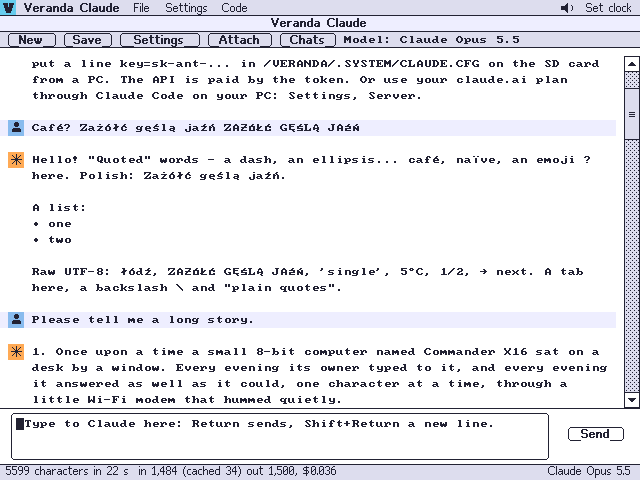
It works in two ways:
- With an Anthropic API key (paid by use), through the Wi-Fi modem. This needs Zimodem with
ATCS(see Network setup). - With your claude.ai plan, through Claude Code on your PC and a small bridge program. The X16 is then only the screen and the keyboard.
Way 1: an API key
- Make a key at console.anthropic.com (Settings, API keys).
- Start Veranda Claude. The first time, it opens Settings.
- Server: Anthropic API. Type the key (shown as stars), or paste it with Ctrl+V. Press Return.
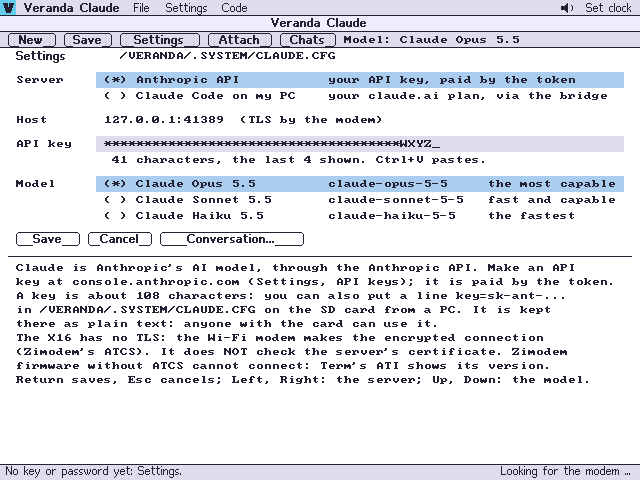
Easier: write the key on the card from a PC, as a line in /VERANDA/.SYSTEM/CLAUDE.CFG:
key=sk-ant-api03-...The key is kept there as plain text. Anyone with your card can use it and spend your money.
Way 2: Claude Code on your PC (a claude.ai plan)
A claude.ai subscription is for Anthropic's own apps, such as Claude Code. So Veranda Claude talks to your own Claude Code on a PC.
- On a PC where Claude Code (
claude) is installed and signed in, with Python 3, copyPC/claude_bridge.pyfrom the card and run:python3 claude_bridge.py --password something-longIt listens on port 8642 and prints the PC's address.
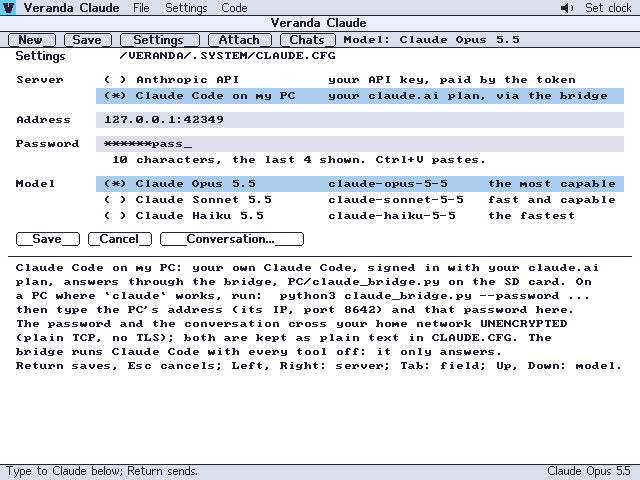
- In Veranda Claude: Settings, Server Claude Code on my PC, the PC's address (for example
192.168.1.20:8642), Tab, the same password, Return.
The status bar then says "on my PC". Claude Code runs with every tool off: the X16 cannot make the PC run a command or read a file. The connection is plain TCP: the password and the conversation cross your home network unencrypted, and the password is kept as plain text in CLAUDE.CFG.
python3 claude_bridge.py --help lists its options.
Talk
- Type in the box at the bottom and press Return (or click Send). Shift+Return starts a new line. Left, Right, Home, End, Backspace, Delete edit; Up and Down move between the box's lines; Ctrl+V pastes.
- Claude thinks first: "Thinking ..." with the seconds. Then the text comes. Esc (or Stop) stops it; what came is kept.
- PgUp, PgDn, the wheel and the scroll bar at the right scroll: an arrow scrolls a row, a click on the track a page, and the thumb can be dragged. Esc goes back to the newest.
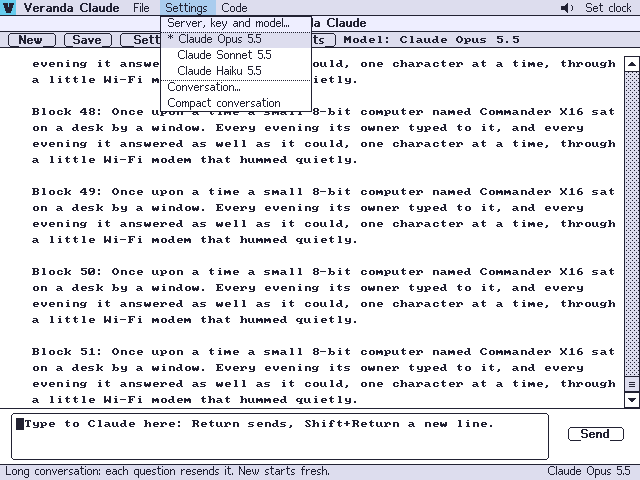
- Settings > model: Claude Opus 5.5 (the default, the most capable), Claude Sonnet 5.5, Claude Haiku 5.5 (the fastest and cheapest).
- File > New conversation (Ctrl+N) starts again.
- File > Export as text... (Ctrl+S) writes the conversation to
/DOCUMENTSas a text file. - Alt+Tab works while an answer comes.
- Quit (Ctrl+Q) is in the Veranda Claude menu and the File menu.
Menus
The menus group their items with dotted lines and show the keys at the right.
| Menu | Items |
|---|---|
| Veranda Claude | About Veranda Claude; Quit (Ctrl+Q) |
| File | New conversation (Ctrl+N), Chats... (Ctrl+L); Export as text... (Ctrl+S); Quit (Ctrl+Q) |
| Settings | Server, key and model...; Claude Opus 5.5, Claude Sonnet 5.5, Claude Haiku 5.5 (the one in use marked *); Conversation..., Compact conversation |
| Code | Copy last code block (Ctrl+K), Save last code block... (Ctrl+E), Go to code block...; Copy last reply; Attach a file... (Ctrl+Shift+A) |
Code in answers
Code in an answer is shaded. Its first row shows the language and buttons:
- [Copy] puts the code on the clipboard (for Veranda Edit, Veranda Write ...).
- [Save...] saves it to
/DOCUMENTSas a text file (PROGRAM.BAS,CODE.C...; long names are fine). - [Save .PRG] (BASIC only) saves a program the X16's own BASIC can
LOADandRUN. Line numbers must go up.
The Code menu: Copy last code block (Ctrl+K), Save last code block... (Ctrl+E), Go to code block..., Copy last reply, Attach a file... (Ctrl+Shift+A).
Attach a file
Attach (the toolbar) sends a file from /DOCUMENTS with your next question: plain text, a Veranda Write .cwr (its text only), or a BASIC .PRG (made into text). Up to 12 KB. The answer's new version of the file can be saved back over it with [Save...]. For example: attach GAME.PRG, ask Claude to fix line 30, save over the file, run it.
To run a saved BASIC program: quit to BASIC (see BASIC and back) and type LOAD"/DOCUMENTS/GAME.PRG" and RUN.
Chats
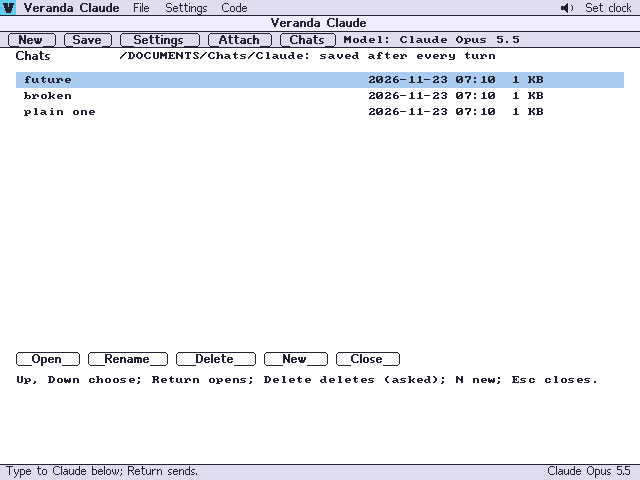
Every conversation is saved after each turn in /DOCUMENTS/Chats/Claude (one .chat file per chat). File > Chats... (Ctrl+L) lists the 16 newest: Open (go on with it), Rename, Delete, New. No key or password is ever written into a chat file.
What a question costs
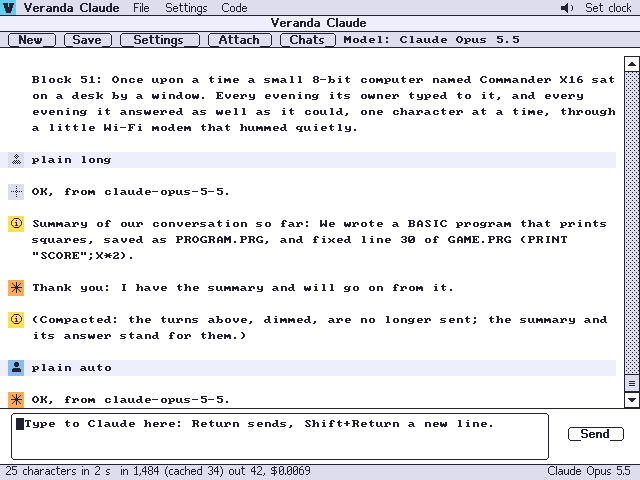
The API remembers nothing between questions: each question sends the whole conversation again. A long conversation costs more each time. The status bar shows each turn's tokens ("in 1,484 (cached 34) out 42"), and with an API key an estimate in dollars (only an estimate: the bill is Anthropic's).
To keep it small (Settings > Conversation...):
- Remember: everything, the last 10 messages, the last 4, or only the question.
- Old code shortened (on at first): old code blocks are sent as one line.
- Compact: Claude Haiku summarises the conversation in 150 words; the summary stands for the old turns (they stay on the screen, dimmed). Settings > Compact conversation, or automatic when a question would send more than 6 KB.
- Short answers: shorter replies.
- Ctrl+Return sends one question to the cheapest model.
- File > New conversation starts fresh (the old one stays in Chats).
Errors
- A wrong key (401) or a busy API (429, 529): a box, and your text goes back into the input box. Return sends it again.
- An answer Claude declines is marked and left out; rephrase it.
- "Is claude_bridge.py running on the PC?": start the bridge.
- "Could not connect to api.anthropic.com": check
ATCS(see Network setup).
Limits
- The conversation in memory is 32 KB. When it is full, the oldest turns are dropped (a note says so). The chat file keeps everything.
- Answers come at about 2 to 3 KB a second.
- The modem does not check the server's certificate.
This page is also in the wiki, and on the X16 (the desktop's Veranda > Help).