 Veranda
MOD Player
MOD Player plays ProTracker modules (4-channel .MOD files) at 16 kHz stereo through VERA's audio. The music keeps playing while menus, boxes and desk accessories are open. Version 1.2, from the x16-mod project. MIT licence, Copyright (c) 2026 Marcin Spoczynski.
Start it
- Double-click a
.MODfile: MOD Player plays it, with its folder as the playlist. - Double-click MOD Player in
/VERANDA/APPS: it starts in your Mods folder (/MODSat first; see Files and folders).
The window
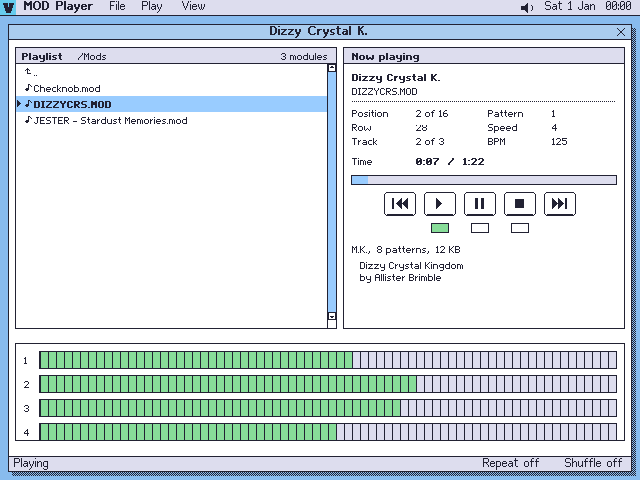
- The playlist: folders and modules,
..to go up. Double-click a module to play it. The one playing is marked. - Now playing: title, position, pattern, row, speed, track, BPM, time, the song's length, a progress bar.
- Buttons: previous, play, pause, stop, next.
- Four VU meters.
- View > Pattern view shows the notes instead of the playlist.
- The status bar: Playing, Paused or Stopped; repeat and shuffle.
Menus
| Menu | Items |
|---|---|
| MOD Player | About MOD Player, the desk accessories |
| File | Open..., Play all (the folder from its first module), Quit |
| Play | Play/Pause, Stop, Next, Previous, Repeat: off/on, Shuffle: off/on |
| View | Pattern view, Playlist |
Keys
| Key | Action |
|---|---|
| Space | play or pause |
| Right | the next module |
| Left | the previous module |
| Esc | stop |
| Alt+O | Open... |
| Alt+Q | quit |
| Up, Down | move the selection |
| PgUp, PgDn | move the selection 15 rows |
| Home, End | the first, the last entry |
| Backspace | up a folder |
| Return | open the folder, or play the module |
The mouse: the playlist (double-click), the scroll bar, the wheel (3 rows), the buttons, the close box.
Notes
- Next and Previous wrap at the ends of the list. A module that does not load is skipped, and its error is shown.
- Shuffle never picks the module that is playing.
- While music plays, the player uses about three quarters of the CPU: other things are slower.
- The music stops when MOD Player quits.
- Up to 255 entries in the playlist.
This page is also in the wiki, and on the X16 (the desktop's Veranda > Help).