 Veranda
Installing Veranda
What you need
- A Commander X16 with at least 512 KB of banked RAM (a stock machine). 2 MB gives more room for programs and documents.
- The X16's SD card, formatted FAT32 (as it comes).
- A mouse. Most of Veranda needs one.
- The Veranda package: a folder with
VERANDA,DOCUMENTSandPCin it. You can build one from the source withtools/mkdist.sh(see For developers). - For the network programs: TexElec's Serial & ESP32 Network Card. See Network setup.
Copy the package to the SD card
Put the SD card in your PC. Copy the package's folders to the top level of the card:
| Folder | What is in it |
|---|---|
/VERANDA | the system: VERANDA.PRG, AUTOBOOT.X16 (the same program, for BOOT), VERANDA.SYS, RBOOT, SHELL.cvt (the desktop), Veranda Setup, README.txt, UPDATE.LST |
/VERANDA/APPS | the programs and desk accessories |
/VERANDA/FONTS | the fonts: Gate Sans, Gate Mono 10 and 12 |
/VERANDA/WALLPAPERS | desktop pictures: Dusk, Still Water, Low Hills and Sunroom Tiles |
/VERANDA/DICT | Veranda Write's spelling code; its dictionaries go here too when you get them (Tools > Get dictionaries) |
/VERANDA/TEMPLATES | Veranda Write's templates, English (EN) and Polish (PL) |
/VERANDA/HELP | VeraBASIC's help, this manual in text form, the VeraBASIC reference card (PDF) |
/DOCUMENTS | your files. The desktop opens here and programs save here. The package puts the VeraBASIC examples here. |
/PC | small Python programs that run on a PC, not on the X16: helpers for Veranda Claude, Ask, Gemini and Update |
Veranda makes one more folder by itself: /VERANDA/.SYSTEM. It is hidden. It keeps your settings, alarms, the clipboard, the Note File, the trash, saved servers and bookmarks.
Your own files and folders on the card stay where they are.
Start Veranda
Put the card back in the X16 and turn it on. At the READY. prompt type:
DOS"CD:VERANDA"
BOOT
BOOT runs AUTOBOOT.X16 in that folder. You can also type LOAD"VERANDA.PRG" and then RUN.
Veranda plays a short sound and shows the desktop, with a window on /DOCUMENTS.
The first start
- On the first start, the desktop runs Veranda Setup once. On a new card it only writes a log. On a card with an older Veranda it moves the files into the new folders (see below).
- If the X16's clock was never set, the menu bar shows Set clock at the right. Click it and set the date and time: see Date, time and time zone.
- The default look is Sunroom: mist-white title bars, a sage-green desktop and sky-blue selections. You can change it in Preferences.
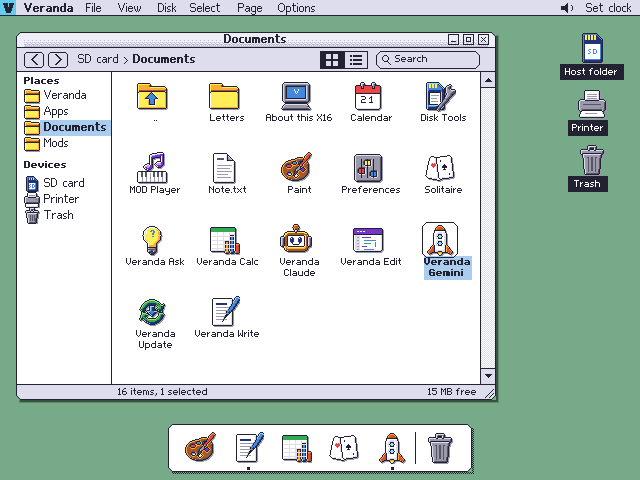
(In the emulator the card's icon at the top right says "Host folder". On a real X16 it shows the card's name.)
A card with an older Veranda
Older Veranda builds kept everything in /VERANDA. To update such a card:
- Copy the package's
VERANDAfolder over the card'sVERANDAfolder (replace the files). - Copy the package's
DOCUMENTSfolder to the top of the card. - Start Veranda. Veranda Setup runs once:
- settings, the Note File, scraps and the trash go to
/VERANDA/.SYSTEM; - programs go to
/VERANDA/APPS(an old copy of a program that is already there goes to/VERANDA/.SYSTEM/OLD); - fonts go to
/VERANDA/FONTS; - your documents (
.cvtdocuments,.TXT,.BMP,.MOD...) go to/DOCUMENTS. If a name is taken there, the file gets~2.
- settings, the Note File, scraps and the trash go to
Programs (.PRG) and your own folders stay where they are. Nothing is deleted. The list of what moved where is in /VERANDA/.SYSTEM/LAYOUT.LOG.
To update a card that already has the new folders, you can also use Veranda Update.
Next
This page is also in the wiki, and on the X16 (the desktop's Veranda > Help).